Shadowrun Returns / Dragonfall / Hong Kong Custom Portraits
Last reviewed: 2026-06-17
Portrait specifications
| Size | Dimensions | File name | Format |
|---|---|---|---|
| Portrait | 212×278 px | NAME.png | PNG |
- Example:
portrait_hero.png (nombre libre)
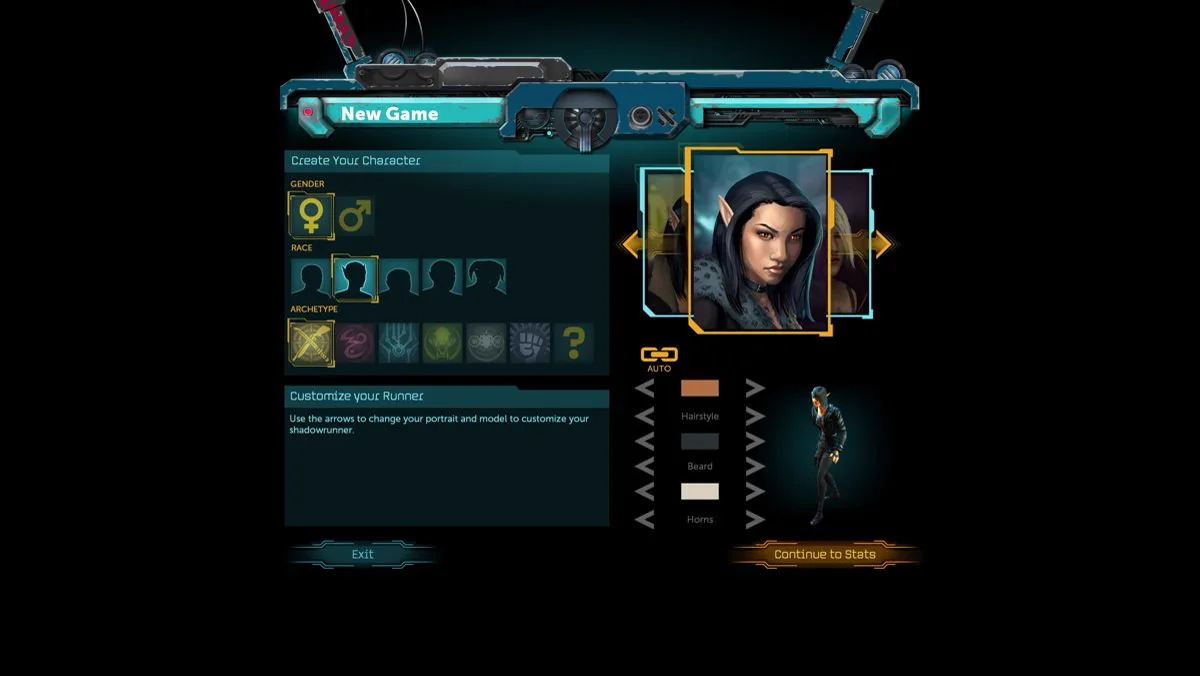
Before you start
The Shadowrun trilogy — Returns, Dragonfall: Director's Cut, and Hong Kong — is developed by Harebrained Schemes. All three games use 212×278 PNG portraits stored inside the game's installation folder under a StreamingAssets path, not in Documents.
Key caveat: a "free name" portrait only works if you replace an existing portrait using its exact original file name. To add a brand-new portrait slot requires the Shadowrun Returns Editor or hex-editing the content pack.
Step-by-step installation (replace method)
- Open PortraitCrafter and select Shadowrun Returns / Dragonfall / HK from the catalog.
- Upload your image. The editor crops to 212×278.
- Export the file. You get a
<name>.png(212×278). - Navigate to the portraits folder for the game you want to modify (see install paths above).
- Identify an existing portrait file to replace (for example
pc_humanmale_1.png). - Rename your exported PNG to match that file name exactly (e.g.
pc_humanmale_1.png). - Back up the original file if you want to restore it later.
- Overwrite the original file with your renamed portrait.
- Launch the game. Your image now appears in place of the replaced portrait.
Adding a new portrait slot (advanced)
To add a new portrait without replacing an existing one:
- Install the Shadowrun Returns Editor (available on Steam as a free tool for Shadowrun Returns owners).
- In the editor, create a new content pack and add a portrait entry with a file name matching the
pc_<racegender>_<N>pattern (start N at 11 to avoid collisions with defaults). - Alternatively, a hex editor can modify the content pack
.plfile to add new portrait references.
Troubleshooting
The custom portrait does not appear in the game
Confirm the file name matches exactly an existing portrait file (case-sensitive on macOS/Linux). Also verify the PNG is placed in the correct game-specific folder — the three games do not share portrait paths.
The image looks stretched or distorted
The portrait must be exactly 212×278. Verify dimensions with an image viewer before placing the file.
macOS: cannot navigate to the portraits folder
Right-click the game's .app file in Finder and choose Show Package Contents. The portraits folder is at Contents/Data/StreamingAssets/ContentPacks/<pack>/art/portraits/.