Temple of Elemental Evil Custom Portraits
Last reviewed: 2026-06-17
Portrait specifications
| Size | Dimensions | File name | Format |
|---|---|---|---|
| Big | 130×150 px | NAME_b.tga | TGA |
| Small | 53×47 px | NAME_s.tga | TGA |
| Mini | 42×37 px | NAME_m.tga | TGA |
| Grey | 53×47 px | NAME_s_grey.tga | TGA (grayscale) |
- Example:
HUF_0780_b.tga, HUF_0780_s.tga, HUF_0780_m.tga, HUF_0780_s_grey.tga + registrar en portraits.mes
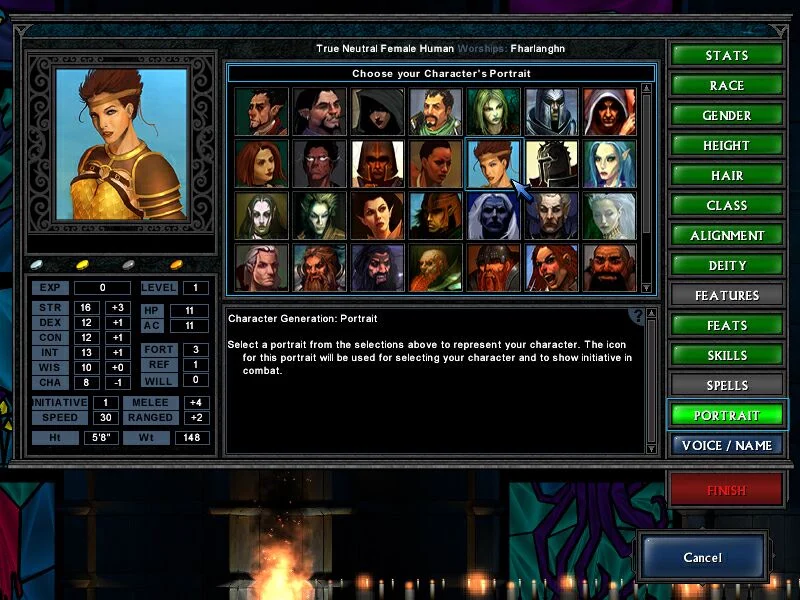
Before you start
Temple of Elemental Evil has the most complex portrait system of any game in the catalog. Each portrait requires four TGA files plus a text entry in portraits.mes. All TGA files must be uncompressed (no RLE).
If you use the Temple+ enhanced engine mod, portrait management is simpler: drop files in a subfolder and they appear automatically.
Step-by-step installation
- Open PortraitCrafter and select Temple of Elemental Evil from the catalog.
- Upload your image and crop or fit it to the frame.
- Enter a base name that follows the community convention (for example
HUF_0780). - Export the ZIP. It contains four TGA files:
<NAME>_b.tga— Big, 130×150<NAME>_s.tga— Small, 53×47<NAME>_m.tga— Mini, 42×37<NAME>_s_grey.tga— Greyscale Small, 53×47 (auto-generated)
- Copy all four TGA files into the portraits folder inside your ToEE installation.
- Open
portraits.mesin a text editor and add an entry:1000 = {<NAME>}(use a free ID number). - Launch the game. The portrait appears in the selection list.
If you have Temple+
Skip step 6. Create a subfolder inside the portraits directory, put your four TGA files in it, and Temple+ registers them automatically.
Troubleshooting
Portrait does not appear in the picker
Either the portraits.mes entry is missing/misspelled, or one of the four TGA files is missing. Both the file names and the base name in portraits.mes must match exactly.
Portrait loads as a solid color or is garbled
The TGA file is likely RLE-compressed. Re-export from PortraitCrafter, which writes uncompressed TGA. Do not open and re-save the TGA in an image editor that defaults to RLE.
The death portrait (_s_grey) shows a wrong image
The greyscale variant should be a desaturated version of the Small file. PortraitCrafter generates it automatically. If you created the files manually, verify the file is greyscale and 53×47.